How to Request to “File On Behalf Of” (FOBO) for a Regulated Entity?
Posted on Nov 14, 2025 inFOBO access grants an eFiler the ability to submit a filing for an eAccount of a regulated entity. NOTE: eAdministrators for the entity inherit the rights to FOBO.
- Login to CDMS eServices.
- Click on Search link from the top navigation.
- In the Search box type in the regulated entity’s name and click Search
- After the search results are displayed click on the Accounts
- Find the entity and in the right Action column click the down arrow then View
- On the Account page click on the Submit Access Request button in the upper right.
- On the Access Request pop-up window from the Request Type drop-down list select File on Behalf Of.
- In the Request Details text box type your justification to FOBO for the entity.
- Click Next
- On the “Your request has been successfully submitted.” pop-up window click Finish
- The eAdministrator for the entity will be emailed your request. If your FOBO request is approved, you will receive an “Access Request Approved” email from [email protected].
How To Video (YouTube): How to Request to “File on Behalf Of” an entity’s eAccount (YouTube Link)
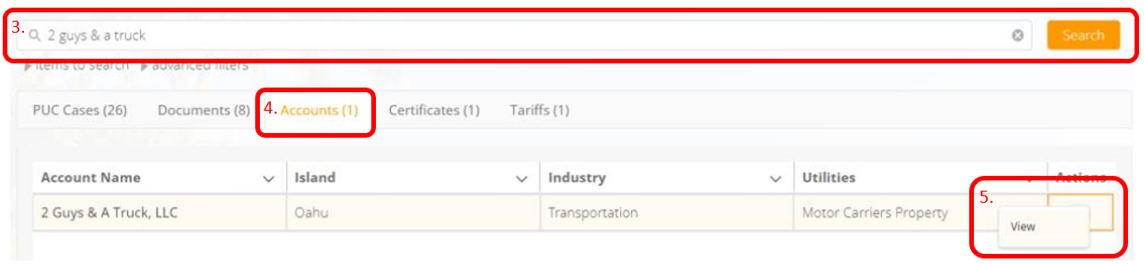
FAQ: How to Request FOBO – Figure 1: Instructions 3 to 5.